“WordPress can’t be fast on mobile” is one of those statements that sounds believable until you look closely at what is actually slowing the website down.
I hear this most often from business owners who have lived with a slow WordPress site for too long. They have tried a caching plugin, compressed a few images, run PageSpeed Insights, seen a poor mobile score and then decided the entire platform must be the problem.
In most cases, WordPress is not the issue. The issue is the build, the hosting, the image weight, the plugin stack, the scripts, the fonts, the theme and years of small decisions that nobody has reviewed as one system.
I recently worked on a WordPress website in the luxury wedding and events space, which is exactly the kind of site people often assume has to be slow. It was visual, polished, brand-led and image-heavy. The portfolio mattered. The feeling of the site mattered. The goal was not to strip it down until it looked like a basic template. The goal was proper WordPress website speed optimization, keeping the visual experience intact while removing the weight that was slowing people down on mobile.
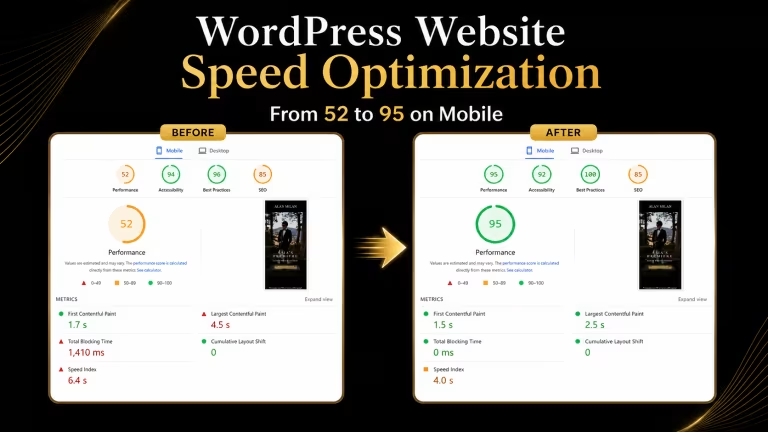
The results were clear. The mobile Lighthouse score moved from 52 to 95. Total Blocking Time went from 1,410ms to 0ms, and Largest Contentful Paint improved from 4.5s to 2.5s.
That kind of improvement is not magic, and it is usually not the result of installing one plugin and hoping for the best. It comes from understanding what the site is loading, what is blocking the browser, which images are too heavy, which files are unnecessary, what can be delayed, what can be compressed and what needs to stay because it is part of the user experience.
WordPress website speed optimization is often misunderstood as removing anything visual, creative or brand-driven from a website. That is the wrong approach, especially for photography websites, wedding websites, luxury brands and portfolio-heavy businesses where the visuals are part of the sale.
The goal is not to make the website plain. The goal is to make the website lighter, cleaner and better structured without damaging the experience the brand is trying to create.
A visual website has to do two things at the same time. It has to look premium enough to build trust, and it has to load fast enough that users do not lose patience before they experience the work.
That balance matters. A wedding photography website, for example, cannot treat images like decoration. The images are the product. They show taste, emotion, timing, composition and trust. If you over-compress them, crop them carelessly or make them feel flat, you may improve a score while weakening the thing the visitor came to see.
But the opposite mistake is just as common. Many visual websites upload large files straight from a photographer, designer or studio export and assume the browser will handle the rest. That is where performance starts falling apart. A file may look incredible on a large screen in a design review, but that does not mean it is ready for mobile visitors, slower connections or real-world browsing.
Good website optimization sits between those two extremes. You do not destroy the visual quality, and you do not ignore the file weight. You prepare the assets properly for the web.
That means using the right dimensions, reducing unnecessary file size, checking how images load across devices, preserving quality where it matters and making sure the browser is not forced to carry more weight than needed.
Mobile website speed matters because most visitors are not judging your website in perfect conditions. They may be browsing on a phone, on a slower connection, between tasks or while comparing you against other businesses.
A WordPress website that feels slow on mobile can lose attention before the visitor ever reaches the portfolio, service page, contact form or booking inquiry.
This is where many business owners get frustrated. Their desktop score may look decent, but mobile tells a different story. That does not always mean the website is broken. It means the mobile experience is under more pressure.
Mobile devices have smaller screens, different processing power and often less forgiving browsing conditions. A large hero image, too many scripts, heavy fonts, poor caching, unused CSS, third-party embeds and tracking scripts can all create friction that is more noticeable on mobile.
For a visual brand, that friction is expensive. The visitor may not say, “This site has poor Largest Contentful Paint.” They will simply feel like the website is slow, heavy or hard to use. They may leave before they fully understand the offer.
That is why website speed optimization is not just a technical task. It is a business task.
Speed affects how people experience your brand. It affects whether they stay long enough to read, browse, inquire, purchase or book. It affects whether the website feels professional or neglected. It affects whether the work gets seen the way it deserves to be seen.
For WordPress sites, mobile speed usually comes down to the quality of the build. WordPress gives you flexibility, but flexibility needs control. If a website has been built with a bloated theme, too many plugins, oversized images, unnecessary animations, heavy fonts and random scripts added over time, the mobile experience will suffer.
That does not mean WordPress is slow. It means the website needs to be audited and optimized properly.
Image optimization for WordPress is especially important for photography and wedding websites because the images are not decoration. They are the product.
A photographer’s website has to protect image quality while still reducing unnecessary file weight, using the right dimensions, compression settings, lazy loading, responsive image delivery and performance checks to make sure the portfolio feels polished instead of heavy.
For the wedding and events site I optimized, image weight was a major part of the conversation. The website needed to feel elegant, visual and premium, but the files were heavier than they needed to be. The goal was not aggressive compression that made the images look worse. The goal was lossless compression with EXIF data enabled, so the images could be reduced in file size without visibly degrading the quality while preserving important metadata.
That matters for photographers and visual businesses because image quality is tied directly to trust. A client looking at a wedding photographer’s portfolio is not just looking for sharp images. They are looking for emotion, consistency, style and confidence that this person can capture one of the most important days of their life.
If the website takes too long to load those images, the experience gets interrupted. If the images are over-compressed, the brand feels cheaper. The sweet spot is making the website faster without making the work feel smaller.
Image optimization is also not just about compression. It is about using the right file size for the right placement. A homepage hero image does not need the same treatment as a small thumbnail. A gallery image needs different thinking than a background texture. A mobile visitor does not always need the same asset as a desktop visitor.
This is where many quick fixes fall short. A plugin may compress images, but it may not solve responsive sizing, lazy loading, layout shifts, render-blocking resources or the way the theme handles media. Website speed optimization needs a full view of how the page is built and how the browser is being asked to load it.
One of the biggest mistakes business owners make is looking for one simple answer to a slow website.
They ask, “Which speed plugin should I use?” or “Is WordPress too slow?” or “Should I switch platforms?”
Those are understandable questions, but they are usually not the best place to start.
A slow WordPress website can be caused by many things working together. It might be image weight. It might be render-blocking JavaScript. It might be poor caching. It might be a slow server response. It might be font loading. It might be third-party code. It might be a theme that loads too much by default. It might be plugins that were added one by one over the years without anyone checking whether they still need to be there.
The work is not guessing. The work is diagnosing.
You have to understand what is loading, what is blocking, what is oversized, what is unnecessary and what needs to stay because it contributes to the brand experience. That is the difference between proper WordPress speed optimization and just throwing tools at a problem.
This is also why Lighthouse, PageSpeed Insights and GTmetrix should be treated as guides, not as the entire story.
Lighthouse is a lab test. It gives you a controlled performance snapshot and helps identify technical issues. PageSpeed Insights can show lab data and, when available, real-world data. GTmetrix gives another useful view of how the site is loading. These tools are helpful, but they need interpretation.
A low score is not there to hurt anyone’s feelings. It is there to tell you where to start looking.
That is an important mindset shift. The score is not the client. The user is the client. The goal is not to please the tool at the expense of the experience. The goal is to use the tool to improve the experience.
WordPress can absolutely be fast on mobile, even for visual brands, photography websites, wedding websites and businesses with strong design needs.
But it has to be built and maintained properly.
That means choosing good hosting, using smart caching, optimizing images before they become a problem, keeping plugins under control, reviewing third-party scripts, managing fonts properly, cleaning up unnecessary assets and treating performance as part of the website’s structure rather than something you fix at the end.
The mistake is treating speed optimization like a one-time plugin install. Real optimization is more strategic than that. It asks what the website is trying to do, what needs to stay, what is slowing the experience down and how to improve performance without damaging the business goal of the site.
For the luxury wedding and events site, the improvement from 52 to 95 on mobile Lighthouse was not about making the website less visual. It was about making the website more efficient.
That is the point.
A premium website should not have to choose between looking good and loading well. That choice usually only exists when the build has not been handled properly.
WordPress is not automatically slow. Bad builds are slow.
The platform is rarely the full problem. The execution usually is.
Share this post


Let’s build a strategy that gets you found everywhere that matters.