
Print2Post
Upload the print PDF of your issue. Print2Post finds every article, follows the ones that continue at the back, and hands you WordPress drafts with the photos and captions in place. Every word is checked against the print.
In review at WordPress.org now. Free, with no paid version.


News, saved as a draft
Landry’s Expands NYC Portfolio with Purchase of Three Fireman Hospitality Landmarks
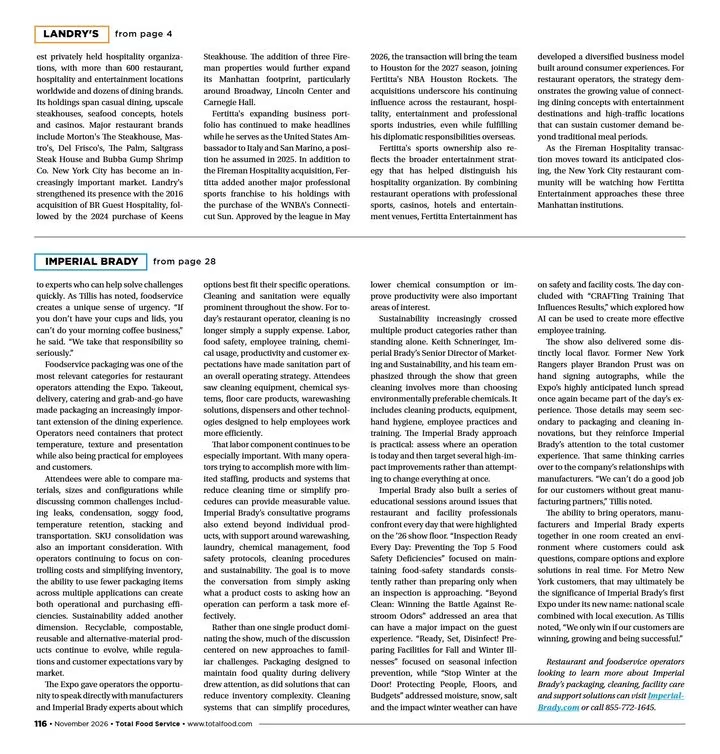
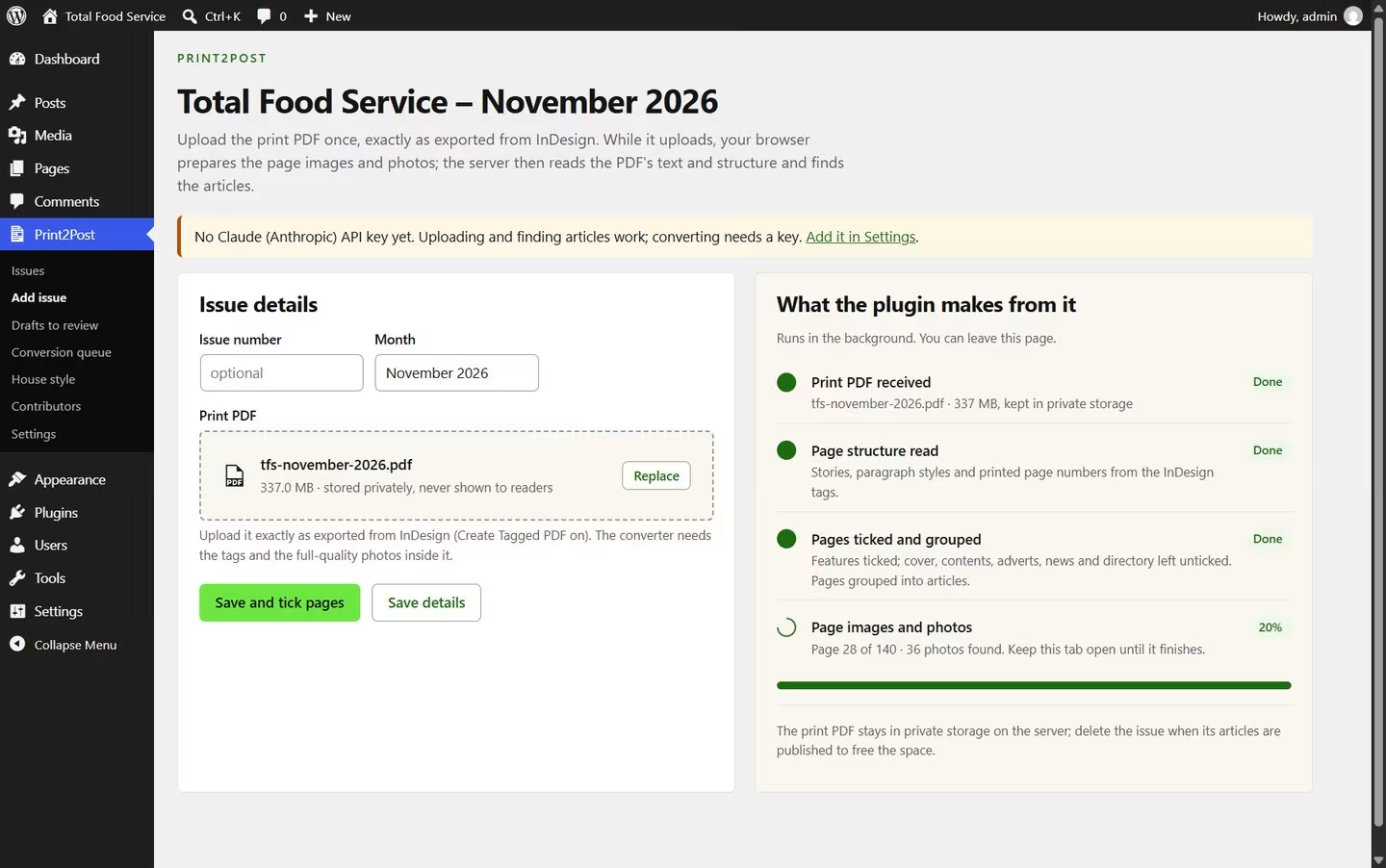
We gave it one issue of a monthly trade newspaper: a 337 MB print PDF, 140 pages. It found 46 articles and 226 photos. Nobody told it where anything was.
The same file that went to the printer, at any size. Once it’s uploaded, your browser prepares the pages and photos, so your server needs nothing extra installed.
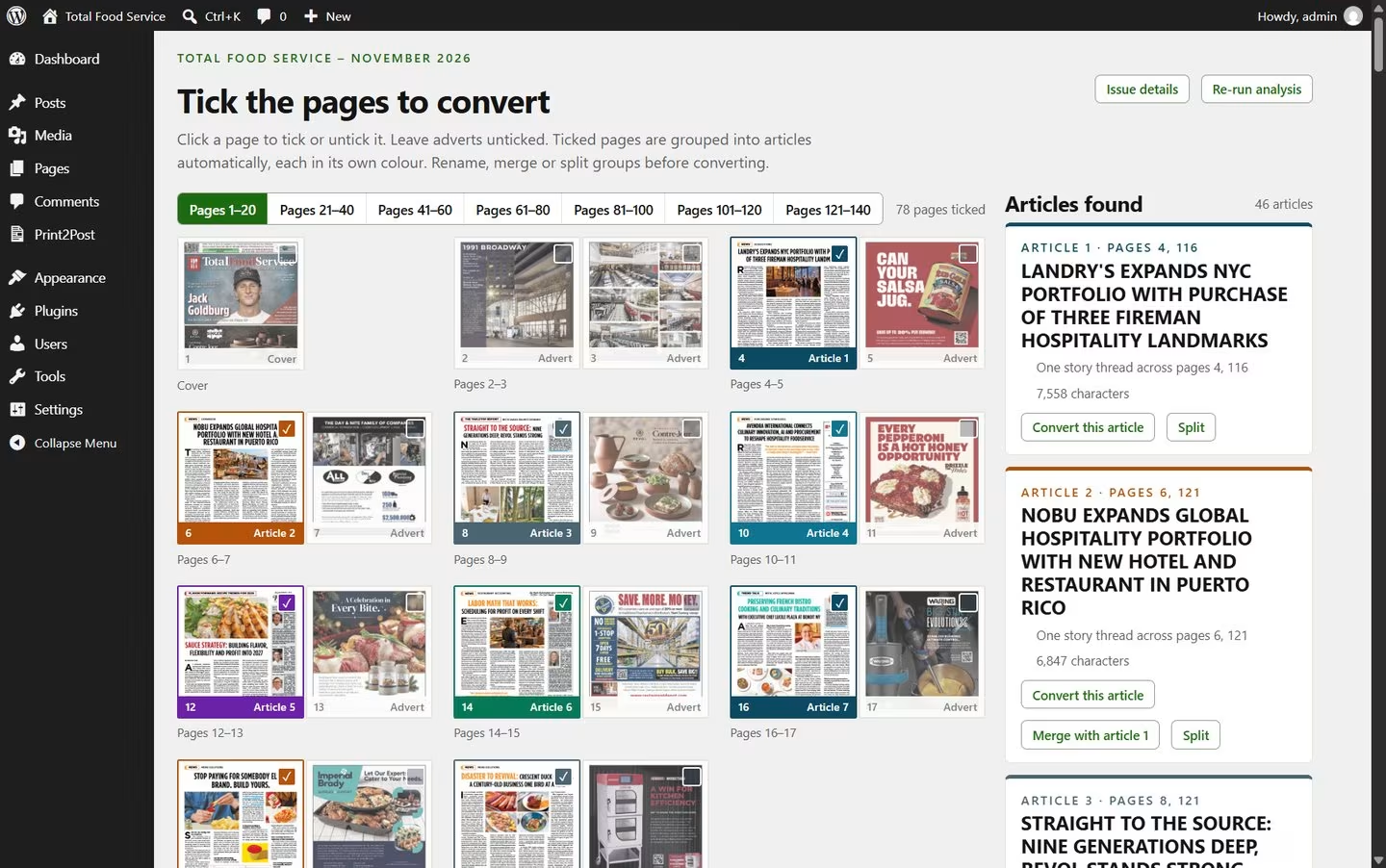
Each colour is one article. Adverts are left out, and a story that starts on page 4 and finishes on page 116 stays in one piece. Merge, split or rename anything it got wrong.
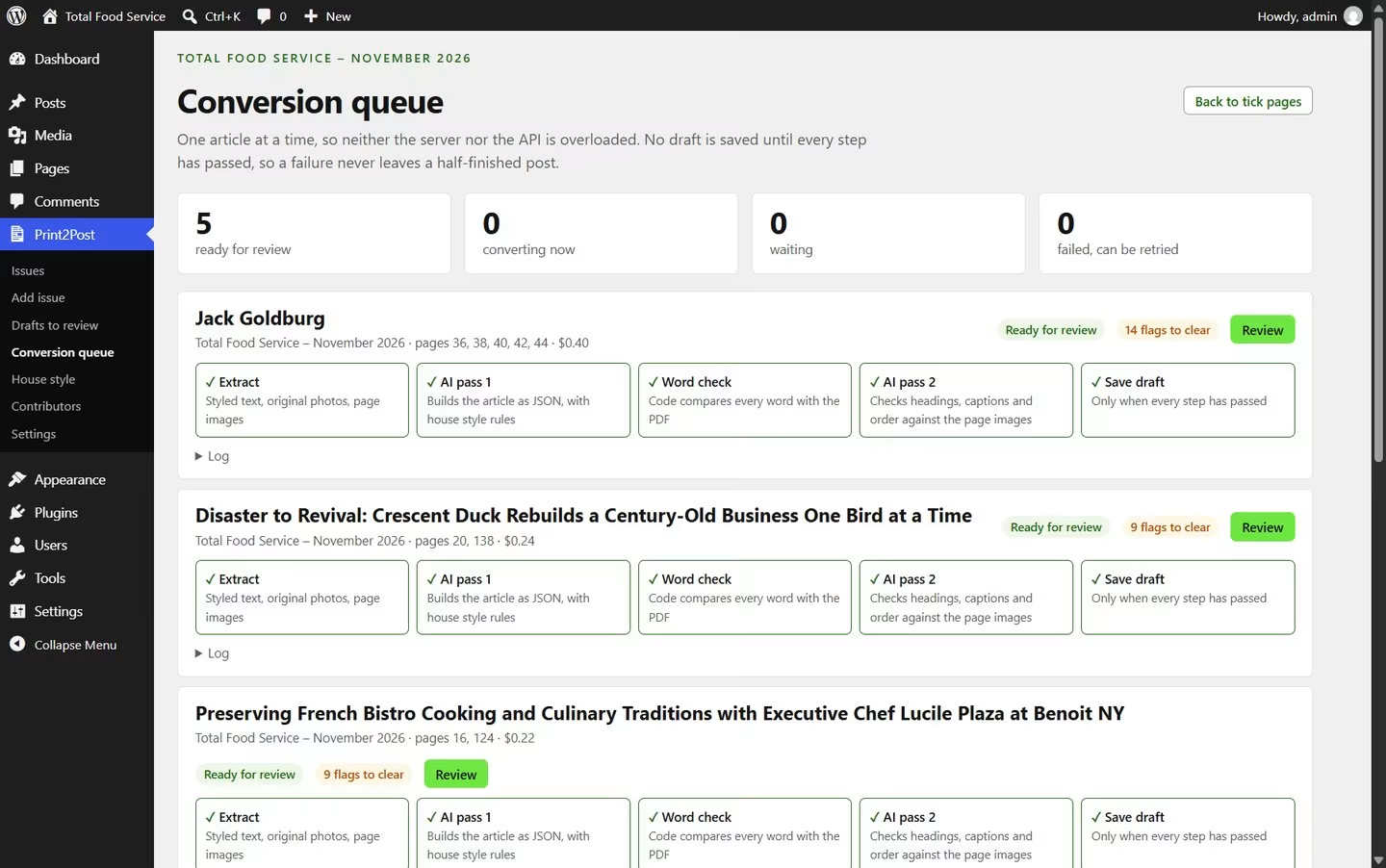
Articles convert one at a time in the background, using your own Claude or ChatGPT key. In this run each one cost between 22 and 40 cents.
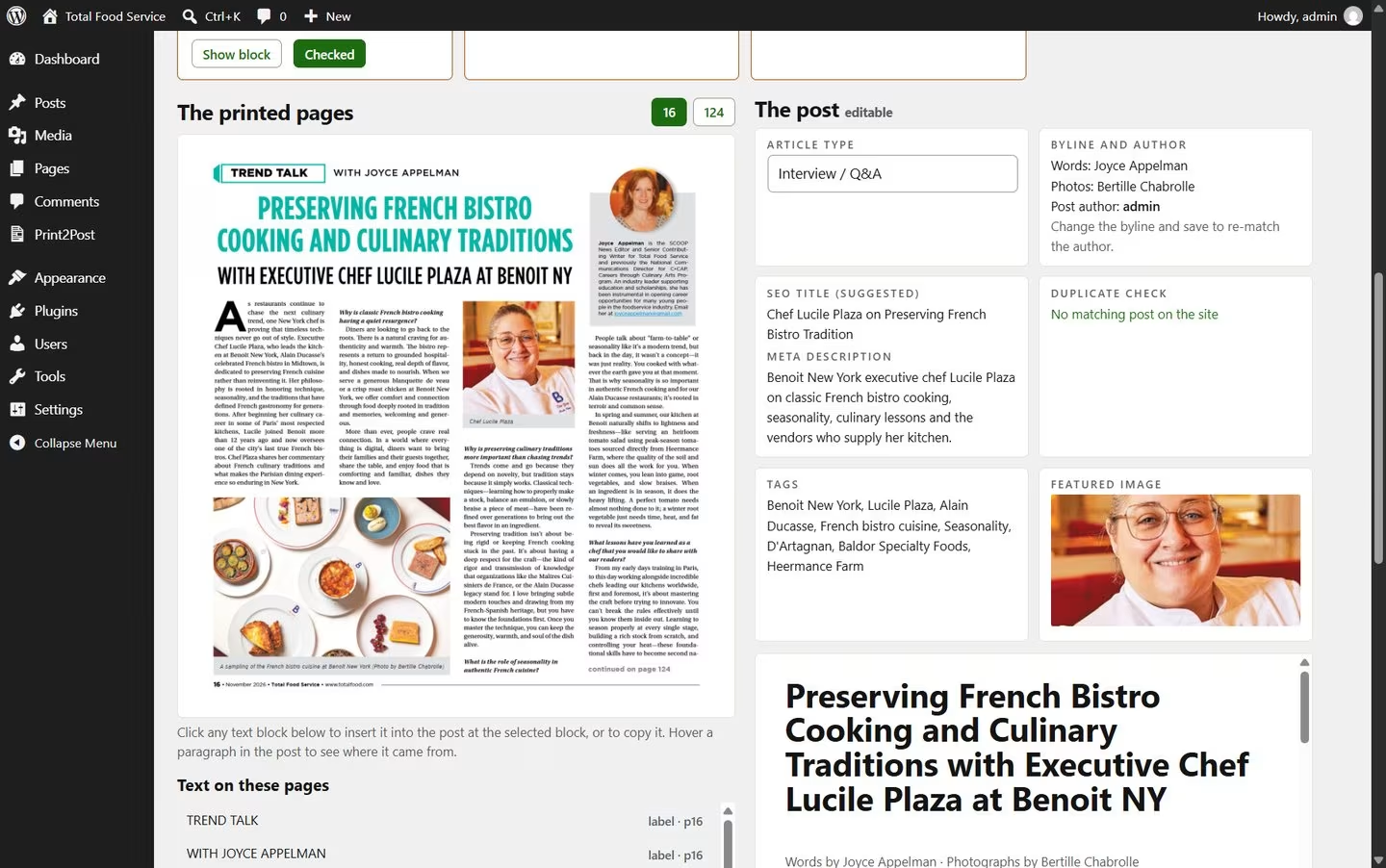
The draft opens beside the printed page, with the byline, tags, SEO title and featured image filled in. You publish. The plugin never does.
The AI arranges your printed paragraphs into a web article. It isn’t asked to write them. Then ordinary code, not AI, compares the draft with the PDF word by word.
Anything missing, added or doubtful becomes a note you clear before the draft can be submitted. These four are real, from two articles in our test.
In the Landry’s story above, all 1,000 words came through unchanged.
Everything around the words, so the review is reading, not rebuilding.
The byline is matched to an author on your site when one exists.
Cross-heads, pull quotes, boxouts and question-and-answer interviews, as printed.
Taken from the PDF at full quality, with print colours converted for screens.
Runs of photos become a gallery. The opening photo becomes the featured image.
Written for each article and saved to Yoast SEO or Rank Math, with tags and an excerpt.
Corrections you make in review become rules for the next issue.
There is no paid version, no trial and no account with us.
| The plugin | Free | From WordPress.org, under the GPL licence. Every feature, on as many sites as you like. |
|---|---|---|
| The AI | 22 to 40 cents an article | What our test cost on Claude Opus 5.5. You pay Anthropic or OpenAI directly, and the plugin stops at the monthly cap you set. |
| Help, if you want it | By quote | The Speed Train can set it up on your site or build something custom. Email us. |
Version 1.0 is the one we use ourselves. This is what we’re building next.
Version 1.0 needs a tagged PDF. Next, it will convert issues that were exported without tags.
Every screen ready to translate, so the plugin can run in the language your team works in.
SEO titles and descriptions saved to All in One SEO, SEOPress and The SEO Framework, alongside Yoast SEO and Rank Math.
If the tab closes while pages are being prepared, carry on from the last page instead of starting again.
Add a photo from the page to the post in one click, and keep your merges and splits when you tick more pages.
Send News, Features or Reviews straight to the categories you choose.
Need something that isn’t here? Tell us what your issue needs.

Print2Post began as a tool for two of our clients. If you need something like it, we’d like to hear about it.
Importers, paywalls, ad tools, newsletter and print workflows, built around how your team works.
Ask about a pluginSpeed and server tuning for busy WordPress sites: Core Web Vitals, caching, database and hosting load.
Get your site optimisedMagazine-style article and home page designs that keep your ads, membership and SEO working.
Talk about a redesignNo. It is told to keep the printed wording, and then the plugin’s own code compares every word of the draft with the PDF. Anything missing or changed is flagged for you to fix before the draft can be submitted.
Claude (Anthropic) or ChatGPT (OpenAI), one at a time. Create an account at platform.claude.com or platform.openai.com, add a little credit, create an API key and paste it into the settings. The settings screen walks you through each step. A ChatGPT or Claude.ai subscription doesn’t include API credit; the API is billed separately.
Not on your own computer; you only need the print PDF. It does have to be a tagged PDF, so ask whoever exports the issue to tick Create Tagged PDF in InDesign’s export dialog. PDFs without tags are planned for version 1.1.
As big as your print file. We test with issues over 300 MB. It uploads in small pieces, so normal upload limits don’t apply.
The PDF stays in a private folder on your own server. When you convert an article, only that article’s text and page images go to the AI provider you chose. Nothing is sent to The Speed Train.
Never. Every article is saved as a draft, or as Pending review if you prefer, for a person to check and publish.
WordPress 6.6 or later and PHP 8.0 or later, on ordinary hosting. You upload from a desktop browser: Chrome, Edge, Firefox or Safari.
Print2Post is in review at WordPress.org. Leave your email and we will tell you the day it is live.
Print2Post is made by The Speed Train. WordPress is a trademark of the WordPress Foundation; Adobe and InDesign of Adobe Inc.; Claude of Anthropic; ChatGPT and OpenAI of OpenAI. Print2Post is not affiliated with or endorsed by any of them. Total Food Service pages are shown with the publisher’s permission.